Shade style presets
The orx-shade-styles library provides a number of preset
shade styles
Prerequisites
If you are working on an
openrndr-template based
project, orx-shade-styles should be ready to use because it is part of the basic
orx bundle, as described in ORX.
Linear gradient
The gradient shade style constructor is a powerful generator for gradients. In the background it produces GLSL
code that runs in the GPU. It accepts an arbitrary number of colors between stops[0.0] and stops[1.0].
import org.openrndr.application
import org.openrndr.color.ColorRGBa
import org.openrndr.draw.loadFont
import org.openrndr.draw.loadImage
import org.openrndr.extra.color.presets.ORANGE
import org.openrndr.extra.color.presets.PURPLE
import org.openrndr.extra.color.spaces.ColorOKLABa
import org.openrndr.extra.color.spaces.toOKLABa
import org.openrndr.extra.shadestyles.fills.SpreadMethod
import org.openrndr.extra.shadestyles.fills.gradients.gradient
import org.openrndr.math.Polar
import org.openrndr.math.Vector2
import kotlin.math.cos
import kotlin.math.sin

fun main() = application {
    program {
        val image = loadImage("data/images/cheeta.jpg")
        val font = loadFont("data/fonts/default.otf", 144.0)
        extend {
            drawer.shadeStyle = gradient<ColorRGBa> {
                stops[0.0] = ColorRGBa.PINK
                stops[0.8] = ColorRGBa.ORANGE
                stops[1.0] = ColorRGBa.RED
                linear {
                    start = Polar(seconds * 60.0, 0.5).cartesian + 0.5
                    end = Polar(seconds * 60.0 + 180.0, 0.5).cartesian + 0.5
                }
            }
            drawer.rectangle(80.0, 40.0, 200.0, 200.0)
            drawer.circle(180.0, 340.0, 90.0)
            drawer.image(image, 300.0, 40.0, 640 * (200 / 480.0), 200.0)
            drawer.fontMap = font
            drawer.text("OPEN", 300.0, 340.0)
            drawer.text("RNDR", 300.0, 420.0)
        }
    }
}Radial gradient
Radial gradients blend colors based on the distance to a center point.
In this example the center point’s x and y coordinates are animated using the sine and cosine of time.
import org.openrndr.application
import org.openrndr.color.ColorRGBa
import org.openrndr.draw.loadFont
import org.openrndr.draw.loadImage
import org.openrndr.extra.color.presets.ORANGE
import org.openrndr.extra.color.presets.PURPLE
import org.openrndr.extra.color.spaces.ColorOKLABa
import org.openrndr.extra.color.spaces.toOKLABa
import org.openrndr.extra.shadestyles.fills.SpreadMethod
import org.openrndr.extra.shadestyles.fills.gradients.gradient
import org.openrndr.math.Polar
import org.openrndr.math.Vector2
import kotlin.math.cos
import kotlin.math.sin

drawer.shadeStyle = gradient<ColorRGBa> {
    stops[0.0] = ColorRGBa.PINK
    stops[1.0] = ColorRGBa.RED
    radial {
        radius = 0.5
        center = Vector2(cos(seconds), sin(seconds * 2.0)) * 0.5 + 0.5
    }
}Conic gradient
Here we can see that ColorOKLABa is also supported by the gradient
generator.
import org.openrndr.application
import org.openrndr.color.ColorRGBa
import org.openrndr.draw.loadFont
import org.openrndr.draw.loadImage
import org.openrndr.extra.color.presets.ORANGE
import org.openrndr.extra.color.presets.PURPLE
import org.openrndr.extra.color.spaces.ColorOKLABa
import org.openrndr.extra.color.spaces.toOKLABa
import org.openrndr.extra.shadestyles.fills.SpreadMethod
import org.openrndr.extra.shadestyles.fills.gradients.gradient
import org.openrndr.math.Polar
import org.openrndr.math.Vector2
import kotlin.math.cos
import kotlin.math.sin

drawer.shadeStyle = gradient<ColorOKLABa> {
    stops[0.0] = ColorRGBa.PINK.toOKLABa()
    stops[1.0] = ColorRGBa.PURPLE.toOKLABa()
    conic {
        rotation = seconds * 60.0
    }
}Mirrored conic gradient
Here we increase the angle to 720.0 and use SpreadMethod.REFLECT to mirror the gradient.
import org.openrndr.application
import org.openrndr.color.ColorRGBa
import org.openrndr.draw.loadFont
import org.openrndr.draw.loadImage
import org.openrndr.extra.color.presets.ORANGE
import org.openrndr.extra.color.presets.PURPLE
import org.openrndr.extra.color.spaces.ColorOKLABa
import org.openrndr.extra.color.spaces.toOKLABa
import org.openrndr.extra.shadestyles.fills.SpreadMethod
import org.openrndr.extra.shadestyles.fills.gradients.gradient
import org.openrndr.math.Polar
import org.openrndr.math.Vector2
import kotlin.math.cos
import kotlin.math.sin

drawer.shadeStyle = gradient<ColorRGBa> {
    stops[0.0] = ColorRGBa.PINK
    stops[1.0] = ColorRGBa.RED
    spreadMethod = SpreadMethod.REFLECT
    conic {
        angle = 360.0 * 2
        rotation = seconds * 60.0
    }
}Quantize and levelWarpFunction
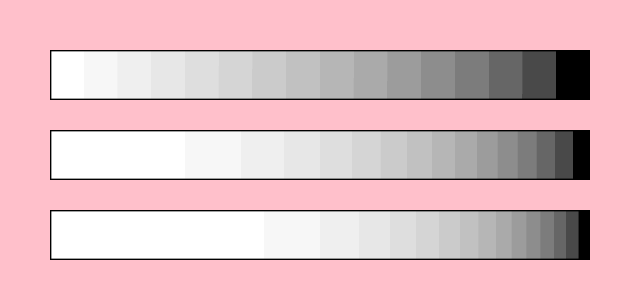
This program demonstrates two more gradient features. The first one is quantization, which lets us define
how many discrete colors we want our gradient to have.
The second new feature is an advanced one: levelWarpFunction lets us inject custom GLSL code into our shader
to modify the gradient level based on the default level, on the pixel’s coordinates, or both.
We apply here a very simple adjustment, to elevate the level to a power of 1.0, 2.0 or 3.0, which skews the
balance between white and black.
When using levelWarpFunction, provide a string formatted like this:
float levelWarp(vec2 p, float level) { return ___; } where ___ evaluates to a float, typically
based in the p and/or level arguments.
import org.openrndr.application
import org.openrndr.color.ColorRGBa
import org.openrndr.draw.loadFont
import org.openrndr.draw.loadImage
import org.openrndr.extra.color.presets.ORANGE
import org.openrndr.extra.color.presets.PURPLE
import org.openrndr.extra.color.spaces.ColorOKLABa
import org.openrndr.extra.color.spaces.toOKLABa
import org.openrndr.extra.shadestyles.fills.SpreadMethod
import org.openrndr.extra.shadestyles.fills.gradients.gradient
import org.openrndr.math.Polar
import org.openrndr.math.Vector2
import kotlin.math.cos
import kotlin.math.sin

fun main() = application {
    program {
        extend {
            drawer.clear(ColorRGBa.PINK)
            repeat(3) {
                val e = it + 1.0
                drawer.shadeStyle = gradient<ColorRGBa> {
                    stops[0.0] = ColorRGBa.WHITE
                    stops[1.0] = ColorRGBa.BLACK
                    quantization = 16
                    levelWarpFunction = "float levelWarp(vec2 p, float level) { return pow(level, $e); }"
                    linear { }
                }
                drawer.rectangle(50.0, 50.0 + it * 80.0, width - 100.0, 50.0)
            }
        }
    }
}domainWarpFunction
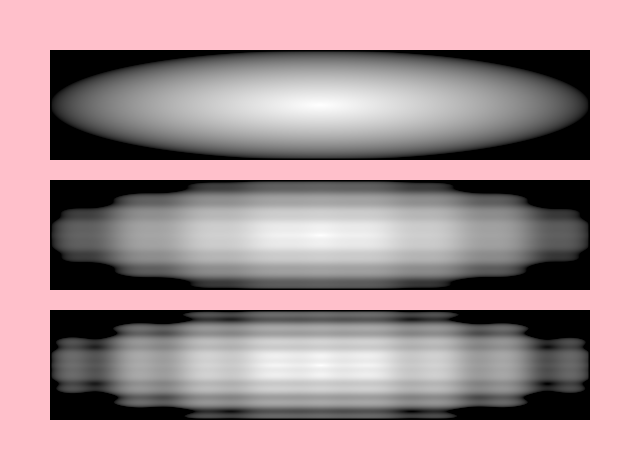
One more advanced feature available to us is domainWarpFunction, which lets us inject custom GLSL code into our shader
to distort the gradient calculations based on the pixel’s coordinates.
When using levelWarpFunction, provide a string formatted like this:
vec2 domainWarp(vec2 coord) { return ___; } where ___ evaluates to a vec2 based on the input coord.
import org.openrndr.application
import org.openrndr.color.ColorRGBa
import org.openrndr.draw.loadFont
import org.openrndr.draw.loadImage
import org.openrndr.extra.color.presets.ORANGE
import org.openrndr.extra.color.presets.PURPLE
import org.openrndr.extra.color.spaces.ColorOKLABa
import org.openrndr.extra.color.spaces.toOKLABa
import org.openrndr.extra.shadestyles.fills.SpreadMethod
import org.openrndr.extra.shadestyles.fills.gradients.gradient
import org.openrndr.math.Polar
import org.openrndr.math.Vector2
import kotlin.math.cos
import kotlin.math.sin

fun main() = application {
    program {
        extend {
            drawer.clear(ColorRGBa.PINK)
            repeat(3) {
                val e = it * 0.02
                drawer.shadeStyle = gradient<ColorRGBa> {
                    stops[0.0] = ColorRGBa.WHITE
                    stops[1.0] = ColorRGBa.BLACK
                    domainWarpFunction = "vec2 domainWarp(vec2 p) { return p + sin(p * 50.0) * $e; }"
                    radial { }
                }
                drawer.rectangle(50.0, 50.0 + it * 130.0, width - 100.0, 110.0)
            }
        }
    }
}For more examples, explore the available gradient demos.